Latest Posts

Showing posts with label testing. Show all posts

Hello guys, it's me again and again, Wicaksono as a backend engineer from Allocateam. This time I want to share you about our method to test-first our database in development. TDD is one of our project requirement, so we must apply TDD in every aspect of our project, and it's kinda frustrating for me as one of my tasks is to implement the database models. There are a lot of pros and cons when searching for the idea of implementing the TDD for database development, there are more cons written on the internet though! 

Most people said that the idea of TDD is great, but implementing it in the database is hard, impractical, and doesn't worth it (comparing the benefits and the efforts). According to Greg Lucas who has been working on SQL and database related works for more than 14 years, he said that, yes it is hard, and even in most agile teams, TDD for databases, if implemented at all, is often the last thing to be put into action. Nevertheless, he also pointed some of the advantages of implementing TDD and why we should bother. You can read more about his writing here.

Thanks to his writing, now it's not about is it possible or not. It's now about how can we implement it on our project. Following his idea in his next article, I kinda figure it out how.

On the previous article, I only use built-in python unittest for testing, but now I think I need an extension called flask-testing to help me. Install it using pip with:

1
pip install Flask-Testing

So here is the example case, I want to create a profile model that contains the name (required) and a phone number. Quite simple right? Well, you can watch our repo for our real implementation of the database models TDD in a more complex structure.

Our project uses SQLAlchemy as our ORM and we placed our model on a file called models.py. Now let's make our model stub first:

1
2
3
4
5
6
7
8
from flask_sqlalchemy import SQLAlchemy


db = SQLAlchemy()


class Profile(db.Model):
    id = db.Column(db.Integer, primary_key=True)

This is how I create our stub for our models, passing it none will cause unreadable error telling the model is broken, so I put a primary key as it's a must-have attribute for a model class. Remember, this is only a stub and we haven't implement anything for the profile model.

Now let's create our test:

 1
 2
 3
 4
 5
 6
 7
 8
 9
10
11
12
13
14
15
16
17
18
19
20
21
22
23
24
25
26
27
28
29
30
31
32
33
34
35
36
37
38
39
40
41
42
43
44
45
46
47
48
49
50
from flask import Flask
from flask_testing import TestCase
from models import db
from sqlalchemy import exc

from models import (
    Profile
)

class TestDatabase(TestCase):

    def create_app(self):
        app = Flask(__name__)
        app.config['TESTING'] = True
        app.config.from_object('config.TestingConfig')
        app.config['SQLALCHEMY_TRACK_MODIFICATIONS'] = False
        db.init_app(app)
        return app

    def setUp(self):
        db.create_all()

    def tearDown(self):
        db.session.remove()
        db.drop_all()

    def test_profile_ok(self):
        profile = Profile()
        profile.name = 'Wicaksono'
     profile.phone = '08111710107'
        db.session.add(profile)
        db.session.commit()

        self.assertIn(profile, db.session)

    def test_profile_no_name(self):
        profile = Profile()
     profile.phone = '08111710107'
        db.session.add(profile)

        with self.assertRaises(exc.IntegrityError):
            db.session.commit()

    def test_profile_no_phone(self):
        profile = Profile()
        profile.name = 'Wicaksono'
        db.session.add(profile)
        db.session.commit()

        self.assertIn(profile, db.session)

Here is the explanation:

create_app: is to create an app with a custom configuration. Sometimes we need to define a different configuration for our testing environment, here, for example, I define a different testing database address so it doesn't create a conflict with my local development database.

  • setUp: is to tell the test how we initiate our app, here I tell the test to create the database schema according to the model.
  • tearDown: is to tell the test what should it do after it done testing, here I tell the test to remove the session and destroy all of the database schemas inside the test database.
  • test_profile_ok: is to test if we passed all of the attributes for the profile model, the model should be successfully committed.
  • test_profile_no_name: is to test if we didn't pass a name for the profile model, the model should raise IntegrityError at commit.
  • test_profile_no_phone: is to test if we didn't pass a phone number for the profile model, the model should be successfully committed because the phone number is not a must.
When we run the test we should expect all of those tests would fail, if it's, that our [RED]. Now let's implement our model:

1
2
3
4
5
6
7
db = SQLAlchemy()


class Profile(db.Model):
    id = db.Column(db.Integer, primary_key=True)
    name = db.Column(db.String(15), nullable=False)
    phone = db.Column(db.String(15))

If our tests have passed after we run it when we have implemented the model, that means our model have met our criteria. That's our [GREEN], well done!

It's quite confusing and time taking for me and maybe you guys to reverse our thinking to apply test-first for more complex model structure, but it just needs some practice! On every next model that I have to implement with TDD, it getting faster and easier to do, so keep it up! Hope my experience will help some of you guys, see you next time!


Hello allocaters, It's me again aye, your allocateam hustler, in this blog post I want to elaborate what I have said in my last blog post about the minor set back I had when implementing some one else's test.

So here it goes, before we begin I want to give you an overview of what happened. In the second scrum meeting our lead developer Wisnu aka CAK decided to take the task of creating unit test of csv file validation. I my self decided to take the creating dummy data. All was well then next scrum meeting came. I was confused of what task to take next. Seeing that there is way more important things that the lead developer needs to take care of. I took the task of implementing the test that wisnu created.

All was well when implementing the csv validation. I had great help from ano because the csv validation needed the pandas module and ano just used the pandas module if you wanna see more check out his blog post here https://blog.allocateam.com/2018/03/csv-file-parsing-in-python-how.html 
so any way all was well, but then disaster strikes. 

So my code was running fine I did all the required test that the test needed. but there was one problem why wasn't my code passing all the required test. 
I spent a lot of time trying to figure out what was wrong with the code I have created. It took me a while but then I figured out it wasn't the implementation that was wrong it was some of the test. 

It turns out in the test driven development the test that you or someone else created might not be correct according to best practice of test driven development it's first add a test run the test if it fails make a little change run the test if it pass than development continues. 
http://agiledata.org/essays/tdd.html

So the lesson learned here is, it's okay if your test is not passed the first time around what you need to do is make a little change run it again and if it pass add another test and so on and so on. What I learned here is that through all the testing I have done it made me more careful of the code that I am about to implement and it made me an overall better devoloper. 

That brings us to conclusion of my blog post, that's all for now don't forget to always implement test driven development as always I am ahmad yazid harharah signing out :) 


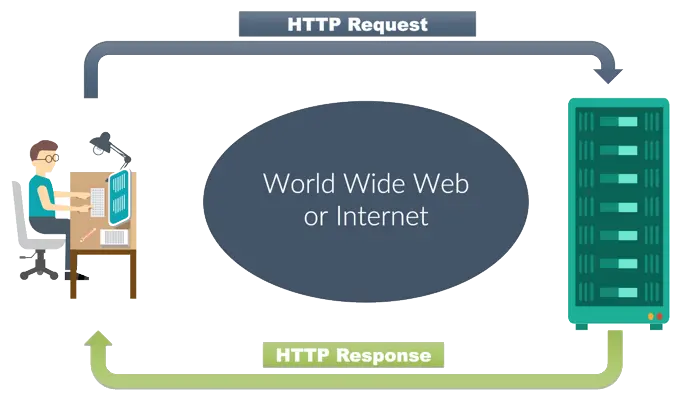
Hasil gambar untuk http request
Hey guys, it's me again Rafiano. Last week, I was desperately confused about making unittest on POST request, sending multiple buffered files (specifically .csv files) to my upload API. Then, after spending a few days researching about how to do it, I finally found a way to send them.

The .csv mock files have to be written as StringIO objects. But, to send it as POST request, they have to be in BytesIO objects. Then, how exactly?

So, after making them into StringIO object you have to read() and decode() it and pass it as __init__ parameter of BytesIO class.


After making them into BytesIO objects, it has to be saved as a dictionary with this format:


then, the object has to be sent as 'multipart/form-data' content_type. This is how:

So basically that's how. See you on the next occasion!


Hello everyone, here I am again, Rafiano. I wanna tell all of you that I was screaming all day all night "WHY CREATING TEST IS SO EFFIN' DIFFICULT?!". Yes, literally. You could probably see my commit in AT-1 branch how desperately I am periodically change my test code for hours, during the night. 

It all changed this morning. Thanks to a very clear explanation about back-end testing, start from creating mock csv to how to create a proper test by allocateam's best lead engineer, Wicaksono (Well he don't want to admit that he is tho lol). I can't imagine how many more hours would I probably have to spend if there's no explanation by him.

So, it all started when I creating this one, haven't used mocker yet and I implement the logic (using selection and repetition) as a test to check whether it contains all the key or not:

class TestParser(unittest.TestCase):
def setUp(self):
self.app = mario.app.test_client()
self.app.testing = True
def test_parse_return_not_none(self):
# TODO use mocker
data = p.parse(None, None)
self.assertNotEqual(data, None)
def test_parse_return_correct_format(self):
# TODO use mocker
data = p.parse(None, None)
correct = False
if "res" in data:
if data["res"] is not None:
filled = True
for i in data["res"]:
if (i["branch"] is not None) and (i["data"] is not None):
all_data = True
for key in i["data"]:
# cek semua atribut
if i["data"][key] is None:
all_data = False
break
if not all_data:
filled = False
break
correct = filled and all_data
self.assertTrue(correct)

Long story short, I was keep refactoring the code like change the test to check whether the output is a valid json or not, is a dict or not, and so on and so on. Until this morning, Wicaksono tell me that it's not how you create a test. He told me that a test simply call a method, pass the proper arguments (using mocker for this case ofc), and simply assert with an expected output. He also told me how to create a mock csv for this case. Now, my testing is what a test should be (thanks again to my friend, Wicaksono). Here's my test now:

class TestParser(unittest.TestCase):
def setUp(self):
self.app = mario.app.test_client()
self.app.testing = True
def test_parse_return_valid_format(self):
file_names = list(validator.TABLE_COLUMN.keys())
files = []
mock_data = {
'branch': [1, 'Tebet', 'Jl. Tebet Raya', 'Rafiano Ruby',
'08131651104', [1], [1]],
'penyuluh': [1, 'Wicaksono Wisnu', '08111710107'],
'territory': [1, 'DKI Jakarta', 'Jakarta Timur',
'Duren Sawit', 'Malaka Jaya'],
'ketua_arisan': [1, 'Bthari Smart', 1, 'Jl. Bunga Rampai',
-6.198495, 106.837306]
}
for filename in file_names:
file = StringIO()
writer = csv.writer(file)
writer.writerow(validator.TABLE_COLUMN[filename])
writer.writerow(mock_data[filename])
files.append(file)
data = p.parse(files[0], files[1], files[2], [files[3]])
expected_output = {
"res":
[
{
"branch": "Tebet",
"address": "Jl. Tebet Raya",
"branch_manager":
{
"name": "Rafiano Ruby",
"phone_number": "08131651104"
},
"penyuluh":
[
{
"name": "Wicaksono Wisnu",
"phone_number": "08111710107"
}
],
"territory":
{
"province": "DKI Jakarta",
"city": "Jakarta Timur",
"subdistrict": "Duren Sawit",
"village": "Malaka Raya"
},
"ketua_arisan":
[
{
"name": "Bthari Smart",
"address": "Jl. Bunga Rampai",
"latitude": -6.198495,
"longitude": 106.837306
}
]
]
} }
self.assertEqual(data, expected_output)

Finally, now I can stop doing this task and can be more productive for my next task(s).

So that's all for me now, Ciao!

Image source:

Hi, everyone! I'm Glory, the most beautiful hacker of all allocateam's hackers 👯

In this post, I want to share about what I have done in the beginning of the first sprint. For my very first task, I decided to choose to learn about front-end testing to support the TDD implementation for our development ahead.

allocateam's front-end system will be developed using React JS in React Boilerplate architecture. There are 2 main testing supported by Boilerplate that make us easier to test our front-end things. First, Unit Testing using Jest. This test can be used for the practice of testing the smallest possible units of our code and functions. We run this test to verify that our functions do the thing we expect them to do. Unit Testing is very useful to test Redux actions and reducers. 

Due to we talk about full scope of front-end development, beside of testing our functions, we need to test about the component we create. That's the reason why we need the next kind of testing, that is, Component Testing. We can use shallow rendering and enzymes, that also supported by Boilerplate. We use them to make sure that every component needed are available on the view layer of our application.

For more technical things about how to implement those tests, go visit the official repository of React Boilerplate here: https://github.com/react-boilerplate

All of those tests will be very helpful for our front-end development process for sure. Due to using TDD approach, don't forget to always Test First 😇


That's all from me. See you on another post!